
To transfer, you need to be in an active chat. In the left corner you will see a symbol with three dots, press there.
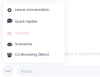
The above menu will then appear. Then press Transfer.
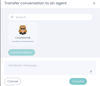
In this box, it will show which agents are online and what skills to you can transfer the chat to.
(Customer service in this case as shown in the picture.)
(Customer service in this case as shown in the picture.)
Select the relevant skill and press transfer.
You have now transferred a chat to a skill! 😃