In ebbot.app under Integration there is the Messenger tab. This integration enables users to chat with Ebbot through Facebook Messenger. It could build a bot in ebbot.app and publish it to a Facebook page.
If you wish to set up messenger for is bot, please contact us and we will help with the configuration.
Below guidelines are for you to know what to think about when building one
A couple of differences on the bot answer
3 buttons
Messenger is different from how Ebbot processes messages and has some limitations that need to be considered when building a messenger bot.
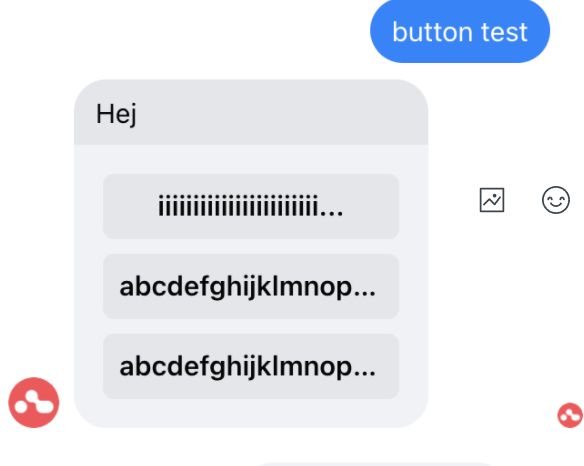
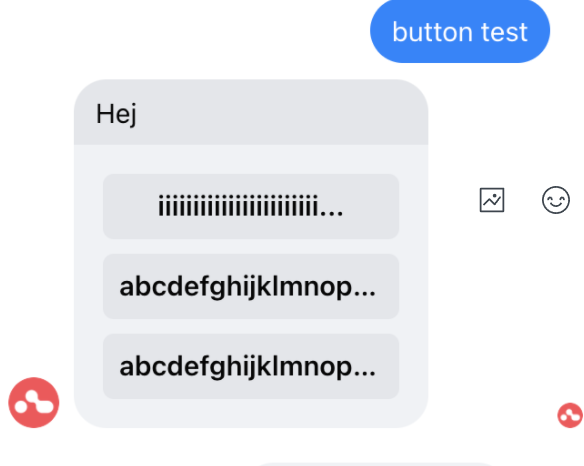
You can display a maximum of three (3) buttons on an ebbot_url card (button). If you want to give a bot answer with more than three buttons, it will not show in the chat, so remember to customize the bottom and give a maximum of three options in each keyboard if it will be published on Messenger.
Maximum number of characters in buttons
The maximum number of characters a keycard can display is somewhere between 14 and 20 characters. There is no exact number as this limitation actually depends on the pixel width of the characters/button text.
Even the mouse pointer text (when you hover over a button) is shortened, so there's no way to see what's beyond the three dots at the end.