
If an agent has forgotten to log out for some reason and you want to set the person to "not ready", do the following, click on Administration and click on Account management so you can see the entire list of users:
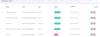
If you want to log out "Test user" for example, do the following:
You start by pressing the icon below next to the selected person.

You get the image below:
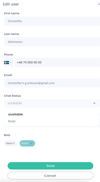
Under Chat Status you get the options "available and busy". Select "busy" and save on the green colored "Save" button.
Done! Good work 😃