
Check if the expected source is retrieved.
-
Reason: The most common reason for an unexpected answer is that the document or source containing the correct information hasn't been retrieved.
-
Solution:
-
Click ‘Show sources’ in the chat widget to view retrieved sources.
-
If the expected source is missing, refer to this guide on retrieving missing sources.
-
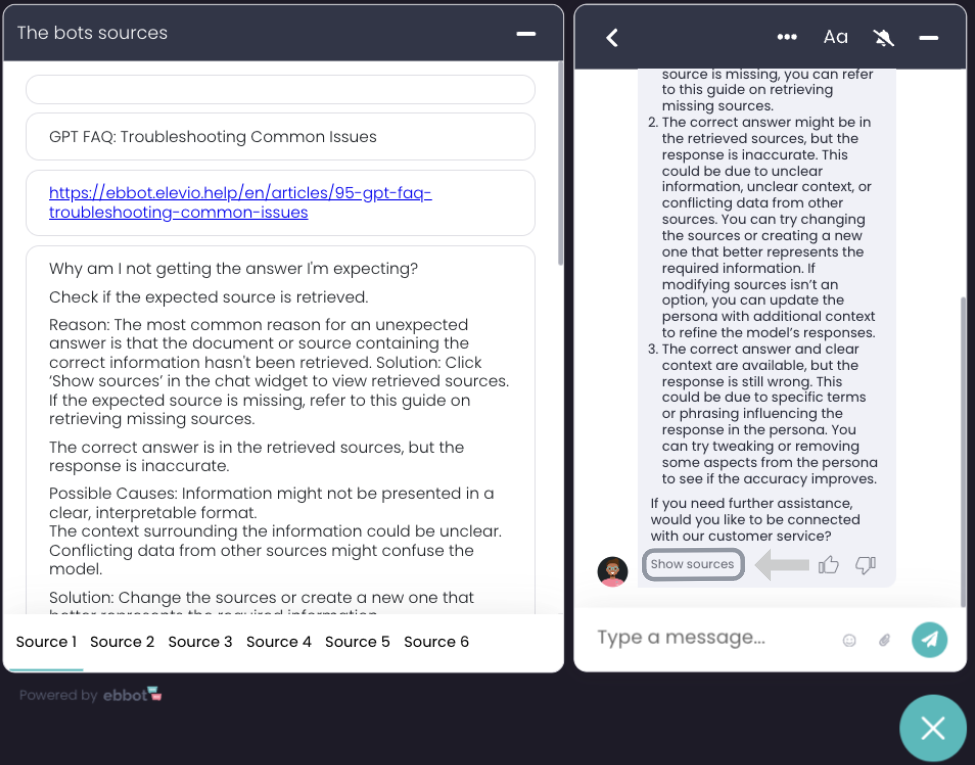
The correct answer is in the retrieved sources, but the response is inaccurate.
-
Possible Causes:
-
Information might not be presented in a clear, interpretable format.
-
The context surrounding the information could be unclear.
-
Conflicting data from other sources might confuse the model.
-
-
Solution:
-
Change the sources or create a new one that better represents the required information.
-
If modifying sources isn’t an option, update the persona with additional context to refine the model’s responses.
-
The correct answer and clear context are available, but the response is still wrong.
-
Possible Cause: The persona might contain specific terms or phrasing influencing the response.
-
Solution:
Try tweaking or removing some aspects from the persona to see if the accuracy improves.
I’ve scraped the website, but not all information is captured.
Scraping issues can arise due to various factors. Follow these steps to troubleshoot:
Step 1: Use the Easy Search function
-
Open your dataset and search for the missing information.
-
If it’s not captured, this points to a potential issue.
Step 2: Common Issues and How to Solve Them
|
Issue |
Description |
Solution |
|
Unreadable Text Content |
Some website text may not work with readability mode. |
Turn off readability mode in source settings and recheck. |
|
Unscraped Pages |
Some pages may be blocked due to anti-scraping measures. |
Enable slow mode in settings or allowlist Ebbot's scraper in your website security settings. |
|
Hidden or JS-Rendered Elements |
Content rendered through JavaScript or hidden within dynamic elements. |
Use CSS targeting to locate and scrape these elements more effectively. |