
Filters are conditional triggers for cards in scenarios.
Types
There are different types of filters that you can apply, depending on what you want the filter to do you have an array to chose from:
Entity - When a entity is triggered.
Parameter(variable) - When a variable is set in the data object.
System - This refers to online agents.
Parameter Table - When a value from the parameter table is set.
Confidence level - When confidence level is met.
Conversation - When the state of a conversation reaches a specific point.
Chat - When the state of a chat reaches a specific point.
Parameter(variable) - When a variable is set in the data object.
System - This refers to online agents.
Parameter Table - When a value from the parameter table is set.
Confidence level - When confidence level is met.
Conversation - When the state of a conversation reaches a specific point.
Chat - When the state of a chat reaches a specific point.
Attributes
Attributes are set variables in the data object like variables. These set through a variety states, buttons and inputs into the data object as wells as from parameter tables and custom components.
Conditions
In this section you can chose what the condition for the value has to be for the card to be triggered.
Example as follows: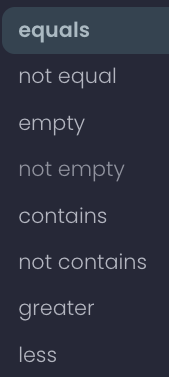
Values
Values are the last condition that has to be met for the card to trigger.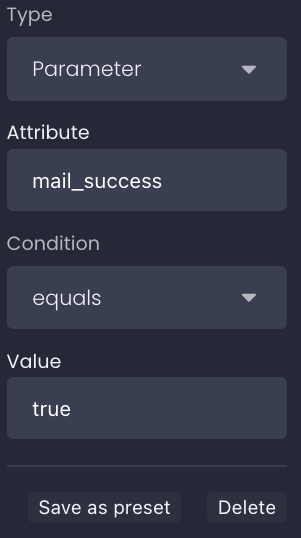
In this example we say that if the variable mail_success is set to true, then play this card.